




How to build an effective AI workflow for internal comms
TL;DR: You don’t need to figure AI out all at once. Start by looking at the tasks that take up most of your time, then use AI to help with the repetitive stuff – like meeting notes, newsletter content and admin-heavy tasks. Check your company’s AI rules first, then start small with one easy win. The aim is not to replace your thinking – it’s to give you more time for the work that really needs your judgement.
Wondering how to build an AI workflow for internal comms that actually works? Take a breath … Rome wasn’t built in a day. And neither will your AI workflow.
That’s worth saying upfront, because a lot of internal comms professionals are carrying unnecessary pressure right now. You should be using AI. You could be saving time. And somehow it feels like everyone else has already cracked it.
They haven’t.
The biggest mistake I see is people trying to design the perfect AI workflow in one heroic afternoon between meetings. As if you’re meant to sit down, map everything, choose the right tools, write the perfect prompts, and emerge fully sorted.
That’s not how this works.
AI adoption in internal comms is gradual. Iterative. Much closer to how we already build good communications – step by step, learning as we go – than to some big upfront transformation.
So instead of asking, “How do I use AI?”, a better starting question is: where does my time actually go each week? You can use this as a guide to see how you can streamline your workflows by incorporating AI.
4 steps to building an AI workflow for internal comms
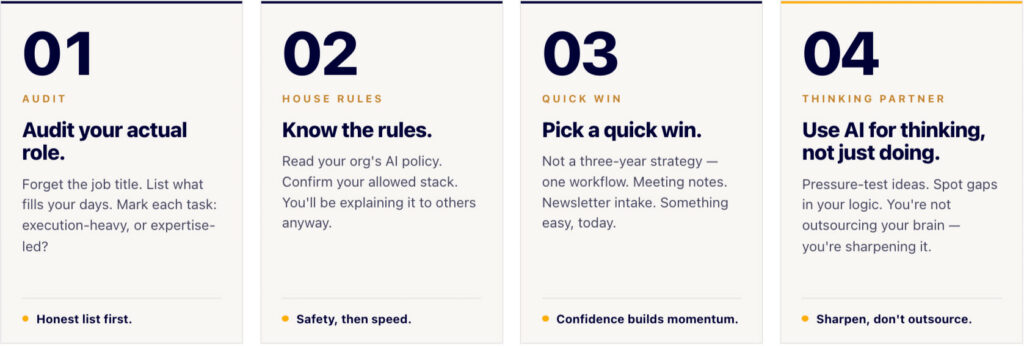
Step 1: Audit your actual role (not your job description)
Before you touch a tool, write down what you actually do.
Not your job title. Not what stakeholders think you do. What fills your days.
- Coordinating and chasing content contributions for internal newsletters and updates.
- Drafting and refining leadership communications that are scoped as quick wins but expand significantly due to reviews, alignment and revisions.
- Attending frequent meetings and acting as the default note‑taker, summariser and follow‑up owner.
Once you’ve got the list, be honest and mark each task:
- Execution-heavy work
Necessary tasks that rely on coordination, formatting and follow‑ups, but don’t really need your judgement to be good. - Expertise-led work
The parts of the role where your experience matters: shaping culture, advising leaders, sense‑making, planning and decision support.
A simple rule of thumb: use AI to take repetitive work off your plate, so it can support the focused work you’d rather be doing do more of.
If you skip this step, you’ll automate the wrong things and wonder why AI feels underwhelming.
Step 2: Understand the House Rules
This isn’t the exciting part, but it’s the safety‑first part. Your AI workflow for internal comms needs to be grounded by compliance.
Before experimenting, find out what your organisation’s AI policies are. Read them properly. If they don’t make sense, book time with someone who can explain them.
As a comms person, you’ll probably need to explain these policies to others anyway – so this isn’t wasted effort.
You also need clarity on your allowed tech stack. AI doesn’t float around on its own. It runs on software.
Some organisations already have enterprise tools like Microsoft Copilot. Many don’t. And a lot of medium‑to‑large organisations are still figuring this out as they go.
There’s also the reality of shadow AI – people quietly using tools just to cope with workload. The goal isn’t to police behaviour. It’s to protect people, including yourself.
You don’t need to reinvent the wheel. But you do need to know which wheels you’re allowed to use.
Step 3: Pick a quick win for your AI workflow for internal comms
Don’t start with your three‑year strategy. Start with something easy. You’re going for a quick win here… something to buy you some time and build your confidence.
AI Meeting Notes are a good place to begin.
Using an AI meeting note‑taker means you can actually be present, instead of half‑listening while typing. But the real workflow win isn’t the recording – it’s the structure around it.
Decide how meetings are named. Where notes are stored. How they’re exported and saved. Come up with a standardised format for the information you want captured, so all your notes have a familiar flow.
Do that, and those notes stop being clutter. They become a searchable bank of insight you can reuse for planning, reviews and strategy.
AI can take the pain out of newsletter content collation
Newsletters are another classic example. You’ll know this if you’re tasked with collating and creating your company newsletter and you receive 42 emails with individual photos in them, or a mail with a 2,000 word badly written AI story.
Instead of digging through inboxes, set one clear system. Ask contributors to use a specific subject line or reply to a single email. Create a rule so everything lands in one folder.
At deadline time, upload the content and ask AI to group items, flag gaps and align content to your usual structure.
You’re not handing over judgement. You’re removing admin and the blank‑page problem.
Step 4: Use AI for thinking, not just doing
This is the part that often gets missed.
AI isn’t only useful for repetitive tasks. It can also support deep, strategic thinking – if you use it that way.
I use AI as a thinking partner to get ideas out of my head, pressure‑test assumptions and spot gaps in logic. I jokingly call this my “Lou AI” approach, but the principle is simple.
You’re not outsourcing your brain. You’re sharpening it.
Used well, this is where AI becomes something you want to work with, not another tool you’re meant to manage.
You don’t have to build your entire internal comms AI workflow yourself
One final mindset shift that matters.
Accountants don’t build their own accounting software. They use tools built for their profession. Internal comms is no different.
There are AI tools designed specifically for our world.
CommsBuddy is a free, purpose‑built internal comms AI assistant – trained exclusively on internal communications context, so you don’t have to keep explaining what a town hall or leadership cascade is. The pro version goes further by learning your company context to support things like newsletters and ongoing content.
LOOP takes this a step up. It’s designed for wider organisational use, with governance, training and management handled for you. It’s AI comms for your entire team (even the deskless ones) and not only does it answer all their questions, but it gives you powerful business intelligence from the data insights.
The point isn’t the tools themselves. It’s not having to become an AI architect just to get value.

The takeaway
AI workflows don’t arrive fully formed.
They’re built the same way good internal comms is built – with clarity, structure and iteration.
Start small. Protect your energy.
And remember, the goal isn’t to do more work. It’s to do the work that actually matters, better.
If it resonates and you’d like to talk through what this looks like for your organisation, a conversation is a good place to start. Set up a call with our team.
Managing internal communications for large workforces is hard.
CommsKit™ makes it easier.
Disconnected people makes workplaces less safe and businesses less productive.
CommsKit has a managed solution that solves this challenge – consistently and on brand.

Discover ENGAGE →
A managed monthly communications programme – brand-aligned campaigns created, designed, and delivered on a fixed calendar. Your team approves. We do the rest.

CONNECT
Managed digital employee communications hub


ONBOARD
A consistent, repeatable onboarding system